
How to move an AI prototype to production
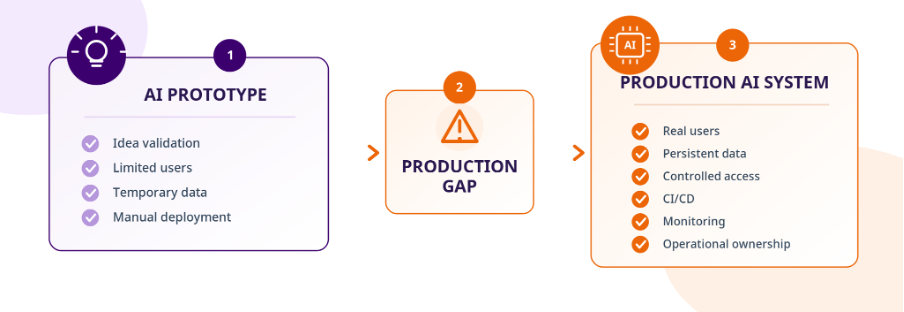
AI tools can turn an idea into a working prototype remarkably quickly. But a demo that works and a system that can securely serve real users are very different things. The challenge is rarely just getting the AI model to work. Production introduces persistent data, authentication, security, testing, deployment, monitoring, governance and operational ownership.
This guide shows you how to identify those gaps and turn a working AI prototype into a system that is ready for production.
What does “production-ready AI” actually mean?
A prototype proves that an idea can work. A production-ready AI system proves that it can keep working - securely, reliably and at the required scale. During prototyping, many production decisions can be postponed. Data may be temporary, deployment manual and access controls basic.
Once real users and real data are involved, those shortcuts need to be addressed. Production readiness means the complete system - not just the AI model - can be securely operated, tested, deployed, monitored and maintained.
Prototype vs Production
| Area | Prototype | Production |
|---|---|---|
| Primary goal | Validate the idea or use case | Operate reliably for real users |
| Users | Test users or a limited audience | Real users with defined roles and permissions |
| Data | Temporary, local or simplified storage may be sufficient | Persistent storage with controlled access |
| Security | Basic or incomplete controls | Authentication, authorisation and secrets management |
| Testing | Manual validation may be sufficient | Repeatable software testing and AI evaluation |
| Deployment | Manual or ad hoc | Repeatable CI/CD process with staging |
| Monitoring | Builder may manually observe behaviour | Logging, metrics, health checks and monitoring |
| Scalability | Designed for limited test demand | Designed for expected production workloads |
| Governance | Often informal or deferred | Defined controls, accountability and human oversight where required |
| Ownership | Usually centred on the prototype builder | Clear operational ownership and documented processes |
| Cost | Prototype-level usage and infrastructure | Ongoing model, infrastructure and service costs monitored |
The key difference is not simply whether the AI works. It is whether the complete system can be securely operated, objectively measured, reliably maintained and continuously improved.
Why AI prototypes get stuck before production
An AI prototype may work perfectly in a controlled demonstration and still be far from production-ready. Problems tend to appear when the environment changes. Real users need authentication. Production data needs to survive restarts. Credentials need to be protected.
Releases need to become repeatable. Increased usage exposes bottlenecks. And when something fails, someone needs to know. Most prototype-to-production gaps can be framed as a simple question: which shortcuts were acceptable during experimentation but are no longer acceptable in production?
| Prototype shortcut | Production question |
|---|---|
| Temporary storage | What happens to critical data after a restart or deployment? |
| Informal user access | Who can access which data and functionality? |
| Hard-coded credentials | How are production secrets protected and changed? |
| Manual deployment | Can another engineer release a change safely? |
| Manual testing | How do you know whether a model or prompt change improved the system? |
| Builder watches errors | Who knows when production starts failing? |
| Low-volume usage | What happens when demand increases? |
| Informal architecture | Are service boundaries, dependencies and data flows understood? |
| Informal ownership | Who responds when something goes wrong? |
| Prototype-level costs | What happens to operating cost as usage grows? |
These gaps should not simply become a long technical wish list. They should become a prioritised roadmap.
From AI Prototype to Production Roadmap

1. Audit
Assess the prototype and gaps
Map objectives, architecture, data and dependencies to identify what to keep, refactor or replace.

2. Architecture
Define the production system
Design reliable system components, data flows, integration points and persistent storage with explicit ownership and scalability.

3. Data & Security
Control data, identity and access
Implement enterprise authentication, role-based access, credential protection, data boundary controls and privacy compliance.

4. Testing & Evaluation
Measure behaviour and failure modes
Run automated unit/integration tests and systematic AI evaluation for hallucination, prompt injection, latency and regressions.

5. CI/CD & Staging
Make releases repeatable
Replace ad hoc deployments with repeatable build, test, and release pipelines, using staging to validate changes safely.

6. Observability
Monitor system behaviour
Deploy logging, metrics, tracing, alerts and continuous AI output monitoring to ensure operational reliability.

7. Deploy & Improve
Launch gradually and iterate
Roll out progressively to users, tracking cost, technical health, AI accuracy, and user feedback over time.
Moving an AI prototype into production does not require rebuilding everything at once. The goal is to understand what already works, identify the production gaps and close them in a deliberate sequence.
1. Audit the prototype and validate the use case
Start by mapping the business objective, intended users, current architecture, data, dependencies and known limitations. Separate validated functionality from prototype shortcuts that could become production risks.
By the end of this step, you should have: a documented view of the current system and an initial list of what to keep, refactor or replace.
Key question: What already works, and what prevents it from operating safely and reliably in production?
2. Define the production architecture
Document the main services, dependencies and data flows. Define the infrastructure and deployment model, and make ownership between components explicit.
Review assumptions inherited from the prototype, particularly where they may not support real users, persistent data or increased demand.
By the end of this step, you should have: a documented production architecture with clear service boundaries, dependencies, data flows and ownership.
Key question: Could another engineer understand how the complete production system is intended to operate?
3. Build the data and security foundations
Replace temporary storage where production requires persistence. Define how application data, user information and relevant AI-generated outputs are stored and accessed.
Introduce authentication and appropriate role-based access control. Move API keys, model credentials, database credentials and other secrets out of application code, and define appropriate data boundaries.
By the end of this step, you should have: persistent data, controlled access and a defined approach to production credentials and sensitive information.
Key question: Can the system protect users, data and privileged functionality under real production conditions?
4. Add testing and AI evaluation
Use conventional software testing for application behaviour, integrations and failure scenarios, alongside AI-specific evaluation for the model behaviour that matters to the use case.
Define measurable criteria for quality, safety and performance so that changes to models, prompts or application logic can be evaluated with repeatable evidence.
By the end of this step, you should have: a testing and AI evaluation framework that can determine whether a change improves or degrades the system.
Key question: Can you demonstrate that the AI meets the required standard before releasing a change?
5. Build CI/CD and staging
Replace ad hoc releases with a repeatable build, test and deployment process. Use staging to validate application behaviour, integrations and AI changes before they reach production.
By the end of this step, you should have: a documented, repeatable route from a tested change to production.
Key question: Can the team deploy safely without relying on undocumented manual steps?
6. Add observability and operational readiness
Introduce logging, metrics, health checks and monitoring so that failures can be detected and investigated. Combine technical observability with AI evaluation, because a healthy application does not necessarily mean the AI is producing acceptable outputs.
Define who maintains the system, responds to incidents and manages important production changes.
By the end of this step, you should have: sufficient visibility and ownership to operate the system without the original builder continuously watching it.
Key question: If the system starts failing or behaving unexpectedly tomorrow, will the right people know?
7. Deploy gradually and keep improving
Where appropriate, introduce the system gradually rather than exposing every user to every change immediately.
Continue monitoring technical performance and AI behaviour after launch. Repeat evaluations when models, prompts or application logic change, and track regressions, security issues and operating costs.
By the end of this step, you should have: an operating cycle for monitoring, evaluating and improving the system after launch.
Key question: Can the organisation maintain and improve the AI system after the initial deployment?
From AI prototype to production in practice
A working AI model does not necessarily mean the product is ready for customers. In one Peruzzi Solutions project, a UK legal-tech startup already had a functioning legal workflow automation AI proof of concept in Azure, but lacked the end-to-end workflow required for enterprise use. Rather than rebuilding the existing platform, the project focused on the missing production layer. In two weeks, the solution was extended with a complete Data Subject Access Request (DSAR) workflow covering request intake, AI-assisted classification, workflow management and response generation, with human review built into the process.
The result was an investor-ready workflow that reduced manual effort by 70–80%, cutting employee time from 20–40 hours to 2–4 hours, while providing a foundation for future customer deployments.
Read the full case study: From AI Prototype to AI Production in Two Weeks →
Security, governance and responsible AI
The roadmap tells you what needs to change. The next question is where the greatest production risk sits — and for AI systems, conventional application security is only part of that picture.
Production controls also need to account for how models behave, where data flows, who can perform sensitive actions and how AI-specific risks are managed.
| Area | Production requirement | Key question |
|---|---|---|
| Authentication | Verify users and services | Do you know who is requesting access? |
| Authorisation | Enforce roles and permissions | Can users access only what they need? |
| Secrets management | Protect API keys and credentials | Can credentials be changed or revoked safely? |
| Data boundaries | Control where sensitive data flows | Do you know what data the AI can access and where it goes? |
| AI safety | Evaluate hallucination, prompt injection, jailbreaking and other unwanted behaviour where relevant | Do you know how the AI can fail? |
| Human oversight | Define escalation and approval where required | When does a human need to intervene? |
| Governance | Assign ownership and controls | Who owns the system and its AI-specific risks? |
| Compliance | Translate applicable requirements into controls | Have relevant requirements been reflected in the system? |
| Auditability | Make important events and changes traceable | Could you reconstruct what happened after an incident? |
| Incident response | Define detection, escalation and corrective action | Who responds when something goes wrong? |
AI security is more than application security
Authentication, authorisation and secrets management remain fundamental. But an AI application can also fail while the surrounding software is technically functioning correctly. The model may produce unsupported information. A user may attempt prompt injection or jailbreaking. Sensitive data may cross an unintended boundary. A workflow may allow the AI to take an action that should require human approval.
Those risks need to become part of testing, evaluation and governance rather than being treated as separate concerns after deployment.
Define human-in-the-loop where it matters
Not every AI workflow requires the same degree of human involvement. Where human review is required, define the conditions that trigger it. Make responsibility for final decisions explicit and ensure reviewers have enough context to assess the AI output. The system should make clear when AI can act independently and when a person needs to intervene.
Make ownership explicit
Production governance ultimately depends on people knowing who is responsible. Assign ownership for the AI system, significant model or prompt changes, production deployments and important AI risks. Document known limitations and accepted risks where appropriate. Governance should continue after launch as the model, prompts, data and surrounding application change. Controls tell you how the system should behave. Evaluation tells you whether it actually does.
How to measure whether your AI is ready for production
A working demo should not determine whether an AI system is ready for production. Define measurable KPIs and evaluation criteria before deployment, then continue monitoring them after launch.
Production readiness should cover six areas: quality, safety, performance, reliability, cost, and operations.
| Area | Core KPIs | Key question |
|---|---|---|
| Quality | Task success rate, hallucination rate, regression rate | Does the AI consistently meet the required quality standard? |
| Safety | Safety evaluation pass rate, unsafe output rate, jailbreak success rate | Does the AI remain within its intended boundaries under normal and adversarial conditions? |
| Performance | P95 latency, throughput, timeout rate | Can the system deliver acceptable performance under expected production demand? |
| Reliability | Availability, error rate, Mean Time to Recovery (MTTR) | Can the system continue operating and recover appropriately when failures occur? |
| Cost | Cost per completed task, total operating cost, cost growth versus usage growth | Can the system operate sustainably as usage grows? |
| Operations | Mean Time to Detect (MTTD), deployment failure rate, incident frequency | Can the team detect, understand and respond to production problems? |
These KPIs are starting points rather than universal targets. Define acceptance thresholds based on the use case, risk level and production requirements. Measurement should also continue after launch. Changes to models, prompts, data, infrastructure or user behaviour can affect production performance and introduce new regressions.
Once these requirements are measurable, the next decision becomes much easier: which parts of the prototype can stay, which need work and which need replacing?
Refactor or rebuild your AI prototype?
Moving to production does not automatically mean rebuilding the prototype from scratch. A more useful approach is to assess each component against its production requirements and classify it as Keep, Refactor or Replace. This can mean building the missing production layer around an existing AI capability rather than replacing it. In our legal-tech case study, for example, the existing AI PoC was retained while the missing end-to-end production workflow was built around it.
| Decision | Use it when |
|---|---|
| Keep | The component already meets its production requirements and can be securely operated, tested, monitored and maintained. |
| Refactor | The underlying approach is sound, but implementation gaps such as security, persistent data, testing, observability or deployment need strengthening. |
| Replace | The underlying design cannot reasonably meet the required security, scalability, reliability or operational requirements. |
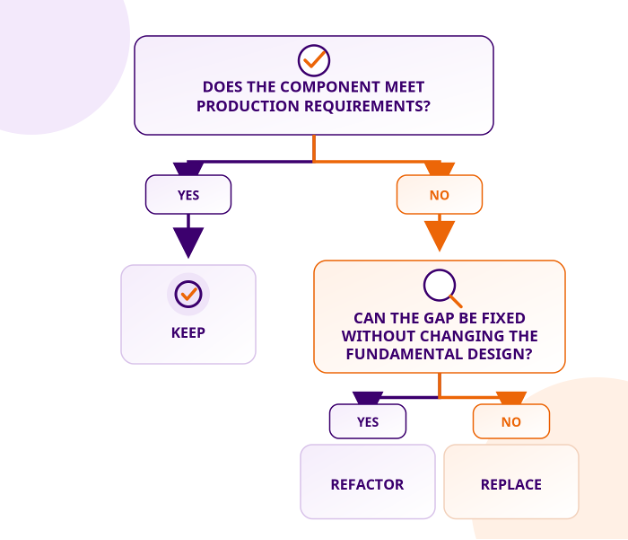
The goal is not to preserve as much prototype code as possible or to rebuild everything. It is to keep validated work where it remains suitable and focus engineering effort on genuine production gaps.
Make the decision component by component
Do not classify the entire prototype as one unit. Assess the architecture, data layer, authentication, AI integration, application logic, infrastructure and deployment process separately.
For each component, document:
- Current state: What does it do today?
- Production requirement: What must it do in production?
- Gap: What is missing?
- Decision: Keep, Refactor or Replace?
- Reason: Why is this the appropriate choice?
- Next action: What needs to happen before production?
This creates a practical migration plan: retain what already meets production requirements, strengthen what can be made production-ready, and replace only what cannot reasonably support the target system.
AI Production-Readiness Checklist
If you have followed the roadmap above, you should now be able to answer the most important question: is the system actually ready to go live? Use this checklist as a final production review. A Not Ready result does not automatically determine the launch decision, but it should trigger an explicit assessment of the risk, owner and next action.
1. Business Case and Scope
- ✓ The business objective is clearly defined.
- ✓ The intended users and use case are understood.
- ✓ The production scope is documented.
- ✓ Success criteria are defined.
- ✓ The prototype has provided enough evidence to justify moving forward.
Ready when: The team can explain what the system should achieve, for whom and how success will be measured.
2. Production Architecture
- ✓ The production architecture is documented.
- ✓ Service boundaries and data flows are understood.
- ✓ External dependencies are identified.
- ✓ Infrastructure requirements are defined.
- ✓ The deployment model is documented.
- ✓ Critical architectural bottlenecks are identified.
Ready when: The team understands how the complete system will operate and what it depends on.
3. Data Persistence
- ✓ Critical application data uses persistent storage.
- ✓ Required data survives deployments and restarts.
- ✓ User data is appropriately separated.
- ✓ Relevant AI-generated data is stored where required.
- ✓ Data access is appropriately restricted.
Ready when: Critical production data does not depend on temporary or prototype-level storage.
4. Authentication and Access Control
- ✓ Authentication is implemented where required.
- ✓ User roles and permissions are defined.
- ✓ Role-based access control is implemented where appropriate.
- ✓ Administrative functionality is restricted.
- ✓ Service accounts have appropriate permissions.
Ready when: Protected resources have a clear and enforceable access model.
5. Security and Secrets Management
- ✓ API keys and credentials are not hard-coded.
- ✓ Production secrets are managed appropriately.
- ✓ Development and production credentials are separated.
- ✓ Sensitive data is protected appropriately.
- ✓ Credentials can be revoked or replaced when required.
Ready when: Sensitive information and privileged access are controlled through deliberate production processes.
6. Testing
- ✓ Critical workflows have test coverage.
- ✓ Failure scenarios are tested.
- ✓ Important integrations are tested.
- ✓ Production-critical functionality is validated before release.
- ✓ Regression testing is part of the release process.
Ready when: Changes can be validated systematically rather than through demonstrations alone.
7. AI Evaluation
- ✓ AI quality criteria are defined.
- ✓ Safety criteria are defined.
- ✓ Relevant performance criteria are defined.
- ✓ Evaluation cases are repeatable.
- ✓ Model or prompt changes can be compared.
- ✓ Relevant AI failure modes are evaluated.
- ✓ Regressions can be identified.
Ready when: The team can objectively determine whether AI behaviour meets the required standard.
8. CI/CD and Deployment
- ✓ Build steps are documented or automated.
- ✓ Tests run as part of the release process.
- ✓ Deployment is repeatable.
- ✓ Production changes are traceable.
- ✓ Failed releases can be addressed through the deployment process.
Ready when: The team can release changes consistently without relying on ad hoc processes.
9. Staging
- ✓ A staging or preview environment is available.
- ✓ Important integrations can be tested before production.
- ✓ Deployment changes can be validated before release.
- ✓ AI behaviour can be evaluated before production.
- ✓ Staging and production are appropriately separated.
Ready when: Important changes can be validated under production-like conditions before going live.
10. Monitoring and Observability
- ✓ Critical application events are logged.
- ✓ Relevant metrics are collected.
- ✓ Health checks are available.
- ✓ Critical failures can trigger alerts.
- ✓ AI/model failures can be identified.
- ✓ Production incidents can be investigated.
- ✓ Monitoring responsibilities are assigned.
Ready when: The team can detect and investigate unexpected production behaviour.
11. Scalability
- ✓ Expected production usage has been considered.
- ✓ Application bottlenecks are identified.
- ✓ Model/API capacity is considered.
- ✓ Database capacity is considered.
- ✓ External service dependencies are considered.
- ✓ Infrastructure can support expected demand.
Ready when: The team understands where scaling problems are likely to occur and how they will be addressed.
12. Governance and Compliance
- ✓ Governance responsibilities are assigned.
- ✓ Relevant AI-specific risks are documented.
- ✓ Data-handling requirements are understood.
- ✓ Applicable compliance requirements are identified.
- ✓ Human-in-the-loop is defined where appropriate.
- ✓ Important changes have an appropriate approval process.
Ready when: The system has clear controls and ownership for the risks relevant to its use case.
13. Documentation
- ✓ Architecture and dependencies are documented.
- ✓ Deployment procedures are documented.
- ✓ Configuration requirements are documented.
- ✓ Important operational procedures are documented.
- ✓ Known limitations are recorded.
Ready when: Another responsible team member can understand and operate the system using the available documentation.
14. Operational Ownership
- ✓ A production owner is identified.
- ✓ Maintenance responsibilities are clear.
- ✓ Monitoring responsibilities are clear.
- ✓ Incident-response responsibilities are clear.
- ✓ Responsibility for model and prompt changes is defined.
- ✓ Deployment responsibility is defined.
Ready when: There is no ambiguity about who is responsible when the system requires attention.
15. Cost Monitoring
- ✓ Model usage costs can be measured.
- ✓ Infrastructure costs can be measured.
- ✓ Database and supporting-service costs are understood.
- ✓ Cost per request or task can be assessed where relevant.
- ✓ Cost changes can be monitored as usage grows.
Ready when: The team understands what the system costs to operate and how those costs change with usage.
16. Post-Launch Improvement
- ✓ Production KPIs continue to be monitored.
- ✓ AI evaluations can be repeated after changes.
- ✓ Regression testing continues after launch.
- ✓ Security updates have an owner.
- ✓ Incidents feed back into testing and evaluation.
- ✓ Cost optimisation continues after launch.
- ✓ Model, prompt and application changes follow a controlled process.
Ready when: The organisation has a defined process for learning from production behaviour and improving the system over time.
Turn the checklist into a go-live decision
Do not treat production readiness as a box-ticking exercise. Classify each area as Ready, Needs Improvement or Not Ready. Every unresolved item should have an owner, next action and explicit decision about the associated risk. Prioritise gaps affecting security, data protection, reliability and safe AI behaviour. Then address the infrastructure, deployment, scalability and operational improvements required for sustainable production use. The objective is not simply to deploy the prototype. It is to build an AI system that can be securely operated, objectively measured, reliably maintained and continuously improved.
From prototype to production
Moving an AI prototype into production means moving from proving that an idea can work to proving that the complete system can keep working with real users, real data and real operational constraints. You may not need to rebuild the prototype. But every shortcut that remains should be an explicit production decision rather than an accidental inheritance from the demo.
