Updates from Peruzzi

Blog posts

Case Study: An AI-powered legal assistant PoC in 10 days
AI 3 min read
LinkedIn
Case Study: An AI-powered legal assistant PoC in 10 days

Overview

We’ve partnered with AILA, an AI-powered legal admin startup to develop an intelligent assistant PoC, capable of processing legal inboxes, drafting responses using legal documents, and raising Jira issues to streamline workflow. The solution needed to seamlessly integrate with existing email and internal tools, without disrupting the established legal workflows.

This case study is about a Proof of Concept (PoC) aimed at quickly validating the product-market fit for the client’s AI-powered solution, while ensuring the system was lean, secure, and capable of supporting rapid iterations based on user feedback.

Problem

The client, an AI-powered legal admin startup, faced a significant problem within its legal teams. Their experts were overwhelmed by routine tasks such as inbox management, follow-ups, and issue tracking, with no central agent to automate or streamline these processes. Specifically:

  • Legal inbox overload: Legal teams spent substantial time managing and responding to routine emails, often losing focus on high-priority legal work.
  • Disconnected systems: There was no central solution to connect emails, legal documents, and Jira-based work tracking, making it difficult to manage the volume of tasks efficiently.
  • Need for a fast MVP: The client wanted to ship a working MVP in under two weeks to quickly test product-market fit and gain valuable feedback from users.
  • Integration challenges: The solution needed seamless integration with existing systems (email, Jira, document management) to avoid disrupting established workflows and ensure that legal professionals could continue to use the tools they were familiar with.

The project needed to address these pain points with a simple yet scalable AI solution that could be deployed quickly while being secure and extensible.

Solution

To meet the client’s needs, the solutions was to design a modular architecture that utilized cutting-edge AI tools and cloud services to automate routine tasks and integrate smoothly with the client’s existing systems.

Implementation Process:

  1. Integration with Google Inbox: We connected the system to the client’s Google inbox using the Gmail API, enabling the AI assistant to automatically fetch and process incoming emails.
  2. Jira REST API: Integrated with Jira to allow the assistant to automatically create, update, and track issues from legal emails and responses.
  3. Document RetrievalAzure AI Search was used to retrieve relevant legal documents and templates, which were then used by the AI assistant to draft responses.
  4. Serverless Architecture: To minimize overhead, the entire solution was deployed using serverless Azure resources. This allowed the system to scale rapidly as usage increased, without the need for complex infrastructure management.

The modular design of the system allowed for rapid iteration, with the flexibility to adjust and add new features based on feedback from legal professionals.

Impact

Delivery: The impact was remarkable. The PoC was delivered in just 10 days - a rapid turnaround that exceeded expectations. The solution was fully integrated with email, Jira, and document management tools, and was tested thoroughly to ensure that it met the client’s needs.

Efficiency: The AI-powered assistant dramatically improved the efficiency of the client’s legal teams by automating routine tasks, reducing the time spent on inbox management and follow-ups. With a human-in-the-loop supervision model, legal professionals could quickly review and approve draft responses, enabling them to focus on more critical work.

User feedback and iteration: The client was able to test the MVP with internal users immediately, gaining valuable insights that would shape the future iterations of the AI assistant. The assistant’s ability to learn from early feedback ensured a rapid cycle of refinement and improvement, positioning the solution for future scaling.

Scalability: The architecture was designed with scalability in mind, using serverless Azure resources and a modular framework that allowed for easy addition of new features as needed. The PoC set a solid foundation for scaling the AI assistant to handle more complex legal workflows in the future.

Key takeaways

This AI-powered legal assistant PoC demonstrated the power of leveraging modern AI frameworks, cloud-based architecture, and seamless integration to solve a real-world problem in the legal field. By freeing up legal experts from non-substantive tasks, the solution significantly improved internal efficiency while supporting human oversight.

In just two weeks, we delivered a lean, effective, and secure solution that solve the client’s problem: a rapid MVP deploymentseamless integration, with a scalable architecture. The project set the stage for future iterations based on user feedback and positioned the client for successful product-market fit in the competitive legal tech industry.

08/08/2025
Low-code and no-code data engineering solutions
Data Engineering 4 min read
LinkedIn
Low-code and no-code data engineering solutions

The low-code/no-code trend has been up and coming for the past few years, with the promise of building applications, websites or software with minimum or no coding experience. Although this allows faster development and for a lower price, it’s still a question: What does the future hold for them?

These low-code methods can be found in data engineering solutions too. The rise of ETL (extract, transform, load) tools aim to simplify data management and to build data pipelines without extensive coding experience. This is where data engineering solutions come into play, with the help of low-code/no-code ETLs. In this comprehensive guide, we’ll explore:

• What data engineering solutions are • Why they’re critical for businesses • The rise of low-code/no-code platforms • Real-world use cases • Key benefits • Choosing the right solution for your needs

What are data engineering solutions?

Let’s dive deep, but start from the beginning. From driving decision-making to enabling predictive analytics, modern businesses rely heavily on data to maintain a competitive edge. But raw data alone isn’t enough - it needs to be organised, accessible, and actionable.

Data engineering refers to the process of designing, building, and maintaining systems that collect, store, and analyze large volumes of data. The goal is to create robust data pipelines and architectures that deliver clean, reliable, and timely data to users and applications.

Data engineering solutions are the tools (such as the ETL), platforms, and services that help businesses build these pipelines efficiently. These can range from open-source frameworks like Apache Spark and Kafka to fully managed cloud services such as Microsoft Azure Data Factory, AWS Glue, and Google Cloud Dataflow.

In recent years, low-code and no-code data engineering solutions have emerged, enabling non-technical users to participate in building and managing data pipelines without needing advanced coding skills. This means, that instead writing codes, these ETL tools use a visual, user-friendly interface to design, build or manage data. Drag-and-drop functionality (just like when you move folders or upload photos), reusable templates (such as WordPress) and pre-built connectors help you to work fast and efficiently.

Types of data engineering solutions: traditional, cloud-native and low-code

Before we dive deep into the low-code/no-code data engineering solutions and their benefits, we need to mention the other solutions.

1. Traditional code-first solutions

This is the “ancient” data engineering solution, which we all think about when it comes to data engineering. For organisations with in-house engineering expertise, traditional solutions like:

  • Apache Airflow (workflow orchestration)
  • Apache Spark (large-scale data processing)
  • SQL scripts & stored procedures are still widely used.

These solutions provide maximum flexibility and customisation but require technical skills to maintain, expert software engineers and data engineers.

2. Cloud-Native Managed Services

Cloud providers have developed fully managed data engineering platforms, including:

  • Azure Data Factory (ideal for Azure cloud ecosystems)
  • AWS Glue (serverless ETL for AWS)
  • Google Cloud Dataflow (for real-time and batch data processing)

These reduce infrastructure overhead and provide scalability on demand. If you want to know more about how cloud native applications work, we recently wrote a guide about cloud native applications.

3. Low-code/no-code platforms

For businesses wanting to accelerate development with fewer technical barriers, low-code/no-code platforms include:

  • Alteryx
  • Knime
  • Microsoft Power BI Dataflows
  • Google Cloud DataPrep
  • Apache NiFi

These platforms offer drag-and-drop interfaces, pre-built connectors, and templates, allowing data analysts and business users to build pipelines without coding.

The rise of low-code/no-code in data engineering

Low-code/no-code data engineering solutions democratise access to data workflows. With a visual interface and minimal code, even teams without dedicated data engineers can:

  • Extract data from multiple sources
  • Clean and transform datasets
  • Feed data into BI tools or ML models

Example:

A marketing team could use a low-code tool to automatically pull data from Google Analytics, clean it, and push it into a dashboard without writing any code. While low-code tools accelerate delivery and reduce IT bottlenecks, they’re typically best suited for small to medium-sized projects or for prototyping before full-scale engineering implementation.

Pros and cons of low-code and no-code in data engineering

Without the constraints of actual coding, these low-code no-code methods increase productivity in data engineering. These automated features also decrease the mistakes and errors caused by humans, which increases data quality. These also allow data engineers to focus on higher-level problem solving – instead of taking so much time to code, they can use their time to planning or strategic initiatives. It is also cost-effective for small and mid sized businesses, as it reduces the dependence on specialised developers.

However, one of the biggest downside of the ETLs is that these tools are less flexible when it comes to complex or large-scale systems. As with every automatisation and visually appealing user-interface, you cannot do anything in these tools you want to. These cannot be customised for specific use cases therefore they might not provide you exactly what you need for your organisation to thrive.

So what does the future hold for them? The future of data engineering solutions

As businesses continue their journey toward digital transformation, the role of data engineering will only grow. The trend is clear:

  • More automation
  • Greater accessibility through low-code/no-code
  • Deeper integration with AI and ML systems Companies that invest in robust data engineering solutions today will set themselves up for competitive advantages tomorrow.

Key takeaways

Data engineering solutions are no longer optional - they are a business necessity. Whether you’re a small startup or a global enterprise, choosing the right mix of traditional, cloud-native, and low-code/no-code tools can accelerate your data-driven success.

16/06/2025
Cloud native application: The ultimate guide cloud migration
Cloud Engineering 4 min read
LinkedIn
Cloud native application: The ultimate guide cloud migration

Cloud native application is the base for cloud computing architecture. Organisations are under the pressure to deliver software faster, operate more efficiently, and scale without compromising reliability, and this is what cloud native development can provide. In this ultimate guide, we talk about what cloud native is and how to build a cloud native application.

What is cloud native?

Before getting into the key characteristics of cloud native applications, let’s dig into the term “native app”. A native app is a software designed to be used on a specific platform or device. Cloud native applications are built in the cloud to take full advantage of cloud computing. Moreover, as cloud technology ensures modern, fast and agile solutions, these applications are flexible, resilient and predictable.

If your applications are not in the cloud yet, in a previous article, we explored 7 proven cloud migration strategies.

Cloud native is an approach to building and running applications that fully exploit the advantages of the cloud computing model. Cloud native systems are designed to be resilient, manageable, and observable, using technologies like containers, microservices, service meshes, and declarative APIs.

Let’s see an example!

We all love to watch series and movies on everyone’s favourite streaming service: Netflix. Netflix is one of the most prominent examples of a cloud-native application. Netflix is a cloud-native pioneer, showing how a company can scale to serve a global audience through a combination of microservices, DevOps, automation, and cloud infrastructure. Here’s how:

  1. Microservices architecture Netflix transitioned from a monolithic architecture to microservices, where each component (user recommendations, streaming, billing, etc.) is independently developed, deployed, and scaled. This allows the platform to handle millions of users simultaneously without downtime.
  2. DevOps + continuous deployment Netflix uses DevOps practices and an internal platform called Spinnaker for continuous integration and continuous delivery (CI/CD). This enables thousands of deployments per day, reducing risk and increasing innovation speed.
  3. Cloud native infrastructure Netflix runs on Amazon Web Services (AWS) and takes full advantage of cloud scalability, elasticity, and global distribution. They can automatically scale up during peak hours (e.g., evenings or new show releases) and scale down when traffic is low.
  4. Resilience & observability Netflix built tools like Chaos Monkey to deliberately cause failures in their systems to test resilience. This demonstrates cloud-native reliability practices like observability, self-healing, and automated recovery.
  5. Containerization & Kubernetes (in some components) While Netflix doesn’t run fully on Kubernetes, some services are containerized for consistency, scalability, and faster deployment - a hallmark of cloud-native DevOps with Kubernetes.

This way, Netflix is fast, reacts to changes quickly and it doesn’t really bug and lag - which is why it’s a pioneer!

Cloud Native and DevOps: A perfect match

Cloud native and DevOps are not just compatible, they’re symbiotic. DevOps focuses on streamlining software delivery and infrastructure changes through automation and monitoring. Cloud native provides the tools and architecture to make this possible at scale.

Benefits of cloud native DevOps:

  • Faster time to market: Continuous integration/continuous delivery (CI/CD) pipelines ensure rapid feature releases.
  • Improved reliability: Automation reduces human error and increases uptime.
  • Greater agility: Developers can test and deploy independently, making teams more responsive.
  • Efficient resource usage: Autoscaling and containerization ensure optimal use of compute resources.

Cloud native DevOps with Kubernetes

Kubernetes has become the backbone of cloud native DevOps. It orchestrates containerized applications, handles scaling, self-healing, and service discovery - all crucial for modern application delivery.

Key Kubernetes features for DevOps:

  • Automated rollouts and rollbacks
  • Horizontal scaling
  • Self-healing capabilities
  • Load balancing and service discovery
  • Secrets and configuration management

Kubernetes enables DevOps cloud native teams to create robust environments that are scalable, resilient, and secure.

Why does cloud native matter?

Cloud native technology gives businesses a huge advantage with its scalability, cost efficiency, speed and agility. It can be scaled down or up based on demand, businesses can pay only for the resource they use, deploy new features quickly to react market changes. It also gives freedom the developers! The advantages for developers is that they can use best-of-breed tools across the software lifecycle, and microservices and CI/CD pipelines allow for rapid iteration.

However, as everything, cloud native comes with its own set of challenges. Its complexity, meaning more and more tools and components to manage, security gaps and without proper cost management, it can be an expensive technology without a skilled team to manage it! It’s highly important to be prepared when you switch to cloud native architecture. Let’s see what you need to build a secure and agile cloud native architecture!

How to build a cloud native architecture?

If you are planning to transition to a cloud native architecture for your business, it involves more than just containers. It requires a shift in mindset and tooling. Here are the core building blocks:

  1. Microservices: Split monolithic applications into smaller, independently deployable services.
  2. Containers (e.g., Docker): Package applications and dependencies into a consistent runtime environment.
  3. Orchestration (e.g., Kubernetes): Manage container deployment, scaling, and networking.
  4. CI/CD pipelines: Automate the building, testing, and deployment of applications.
  5. Service Mesh (e.g., Istio): Manage communication between services with traffic control, security, and observability.
  6. Infrastructure as code (e.g., Terraform, Helm): Define and manage infrastructure through code to ensure repeatability and automation.
  7. Observability and monitoring: Use tools like Prometheus, Grafana, or Datadog to monitor application health and performance. Best practices for cloud native success
  8. Start small: Begin with a pilot project to understand tooling and workflows.
  9. Invest in culture: Foster a DevOps culture that values collaboration and automation.
  10. Standardize tooling: Choose tools that integrate well and support your stack.
  11. Focus on observability: Make monitoring a first-class citizen from the start.
  12. Automate everything: From testing to deployments, automation is key to efficiency.

With keeping these best practices, you will get exactly what you were promised with the cloud native technology: flexibility and agility.

Key takeaways

Cloud native and DevOps are the pillars of modern software development. In this ultimate guide, we showed that by embracing a cloud native architecture - backed by robust cloud native DevOps with Kubernetes, organisations can innovate faster, scale efficiently, and stay competitive.

As you begin your journey, start small, build the right foundations, and scale confidently with the right strategy and partners.

23/05/2025
7 proven cloud migration strategies
Cloud Engineering 5 min read
LinkedIn
7 proven cloud migration strategies

*Cloud migration *has become a strategic priority for businesses seeking agility, scalability, and cost-efficiency. However, executing a smooth transition to the cloud without disrupting business operations is not easy – it requires careful planning and the right cloud migration strategy.

At Peruzzi Solutions, we specialise in crafting tailored cloud migration strategies from full-scale transformation projects to incremental migrations using Microsoft Azure. In a previous article, we discussed a guideline about cloud migration. In this article, we’ll share the 7 proven types of cloud migration strategies that minimise business disruption, and share practical insights to help you choose the best approach for your organisation.

Why do cloud migration strategies matter?

Moving to the cloud is not a one-size-fits-all process. As each organisation has unique workloads, legacy systems, compliance requirements, and risk tolerance levels, adopting the wrong migration strategy can result in business downtime, data loss, or cost overruns. We all experienced the mini heartattack when hours of work did not get saved because the compuer froze or it needed an immediate restart. Now imagine this data loss with years of hard work just because of moving to the cloud! Fortunately, there are cloud migration strategies to avoid these very frustrating scenarios. 

Understanding the core migration strategies in cloud computing allows businesses to make informed decisions while minimising disruption and maximising return on investment.

The 7 R’s of cloud migration strategies

1. Rehosting (lift-and-shift)

Best for: Fast migration with minimal code changes

Use case: When speed is critical or you’re dealing with legacy systems

Rehosting involves moving existing applications to the cloud with little or no modification. This is often the starting point for many companies initiating their Azure cloud migration strategies or AWS cloud migration strategies.

2. Replatforming (lift-tinker-and-shift)

Best for: Improving performance without changing the app’s core architecture

Use case: When small optimisations (e.g., using managed services) can reduce operational burden

This strategy involves slight adjustments to applications to take better advantage of cloud-native features. For example, moving from self-hosted databases to Azure SQL Database or Amazon RDS.

3. Repurchasing (drop-and-shop)

Best for: Replacing legacy software with SaaS

Use case: When the existing solution no longer meets business needs

Repurchasing involves moving to a new, cloud-based product (often SaaS, Software as a Service). Think Salesforce replacing a legacy CRM. It’s a clean break and can significantly reduce costs.

4. Refactoring or re-architecting

Best for: Building cloud-native apps for scalability and performance

Use case: When legacy applications block innovation or don’t scale

This is the most complex but also the most rewarding of the cloud migration strategies. It involves reimagining how an application is architected and developed using cloud-native tools and frameworks.

5. Retire (eliminate)

Best for: Cutting unnecessary costs

Use case: When certain apps or services are no longer needed

Just like we humans, some applications also need to retire after they have done their job. Identifing redundant or unused applications during the migration assessment phase can save time, money, and complexity during your move.

6. Retain (revisit)

Best for: Apps not ready for cloud or with compliance constraints

Use case: When specific workloads must remain on-premises

Sometimes, the best decision is to retain certain apps temporarily. This is a strategic delay rather than resistance to change. The key is to document why they’re staying and when to reassess.

7. Hybrid approach

Best for: Organisations with mixed cloud-readiness

Use case: Gradual migration, minimal risk

Many enterprises benefit from combining multiple strategies. A hybrid cloud migration strategy blends on-premises, public, and private cloud environments for flexibility and control.

How to minimise business disruption by choosing the right strategy

Whether you’re evaluating  Azure cloud migration strategies or multi-cloud options, success starts with a tailored roadmap to minimise business disruption. Here’s what we consider:

  • Workload analysis
  • Compliance and security requirements
  • Cost-efficiency and ROI
  • Business continuity and risk tolerance
  • Team readiness and training needs

Our cloud migration consulting services start with a readiness assessment and architecture review, followed by strategic recommendations that align with your goals.

Key takeaways

Choosing the right cloud migration strategy isn’t just a technical decision, it’s a business one. Whether you’re looking to lift-and-shift, replatform, or fully re-architect your applications, Peruzzi Solutions ensures a smooth journey to the cloud with minimal disruption.

19/05/2025
Is AI making us dumber?
AI 5 min read
LinkedIn
Is AI making us dumber?

AI makes our daily life easier - although we mostly use it to increase our performance and efficiency at work, we still take advantage of it at home too. Writing and updating our grocery list or asking Alexa to play our favourite music or call our loved ones, AI is becoming more integrated into our lives. As it is still a new feature, we are not completely aware of its downfalls and challenges. While we might envision and experience how easy life can be with the support of AI, we might also become its victims. So, a new question has arisen: are we getting smarter or dumber due to AI?

What do we use AI for?

As we already explored in a previous article, Are you an AI power user?, AI is crucial in our work. The chatbot we interact with online when we have questions regarding our subscriptions, when we try to pay an electricity bill, or when we are contacted on LinkedIn by a “recruiter” are all examples of AI in action.

More and more industries benefit from using AI, whether it’s healthcare, finance, or transportation, but even education can harness its advantages. Diagnostics, appointment scheduling, answering the most searched medical questions, analysing market data, creating budgets, or weather forecasting all rely heavily on predictive modelling used by AI and machine learning.

Software developers use ChatGPT to fix bugs in the code they wrote, marketers create images, brainstorming teams ask for ideas and solutions from an AI, and newsletters are scheduled and sent out to target audiences. All of this is making some professions extinct and getting the job done - faster, more efficiently, but not always better than humans would do.

People quickly learned to notice when an article or post was written by AI, and when videos were created by AII. Whether it’s missing fingers from people’s hands in a video or too many emojis used in a text. We are becoming more and more avoidant toward anything that has something to do with AI, and yet still drawn to human-created content. Personalisation has never been this easy, but still, uncanny valley - the eerie sensation when we encounter a robot with human-like characteristics - is on the rise.

AI is similar to calculators – we cannot live without them anymore when we try to divide 24,569 by 45, but in return, we forget how to use basic math equations.

AI and critical thinking – enhancing or diminishing?

A team of researchers from Carnegie Mellon University and Microsoft decided to look into the effect of AI on critical thinking. Their recent paper conducted a survey with 319 knowledge workers to explore when and how people perceive their own critical experience. According to the results, when they primarily use GenAI to ensure the quality of their work - for example, meeting specific criteria - they engage in critical thinking, and it can improve work efficiency.

However, it can lead to overreliance on GenAI tools, resulting in fewer critical thinking efforts. The efforts shift to information verification and AI response integration instead of problem-solving, and to task stewardship instead of execution. This means we rely on the information we are provided by GenAI without fact-checking or even questioning the content we read. GenAI, however, doesn’t work like that - you can ask it to argue for or against the same topic, and it will be able to convince you of either, depending on your preconceptions.

AI tool usage and cognitive offloading

According to another recently published study, there is a significant negative correlation between the frequency of using AI tools and critical thinking. Even though AI tools have their astonishing benefits, they also decrease our engagement in deep and reflective critical thinking through cognitive offloading. Cognitive offloading means relying on the external environment to reduce our cognitive demand, such as taking notes during a meeting or writing a shopping list.

We are prone to use AI the same way, encouraging us to use our brain and memory less - and why wouldn’t we, if there is a tool to do our cognitively challenging tasks? Younger participants are also more at risk of AI dependence and scored lower in critical thinking than older participants in the study. Higher educational attainment led to better critical thinking, so this might be a good way to avoid AI dependence and support the development of the correct way of using GenAI.

What’s next for AI and our critical thinking abilities?

The more we use AI in our work life or private life, the more we trust its output. This means we forget to verify its accuracy, and we can fall prey to compromising on the standards of excellence. There should be a balance, as we should treat AI as a tool to support us and our work, not to replace human interaction or critical thinking.

Higher education, regulations, and AI training need to be involved to ensure that professionals don’t rely heavily on GenAI and that they understand AI’s limitations and flaws in verification. Without proper training and regulation, we will become dumber and might lose one of our biggest assets: critical thinking.

09/05/2025
Remote work and working from home - Benefits in the IT sector
Resource Augmentation 5 min read
LinkedIn
Remote work and working from home - Benefits in the IT sector

2020 completely changed how we see jobs and how we work, and we met the advantages of remote work. White-collar workers switched from one day to the next by staying in the safety of their homes. Meetings and business calls were moved up into the clouds. Zoom and Microsoft Teams skyrocketed as the demand for these online meeting software increased so much that the companies were not able to fulfill the needs.

Slowly but surely, we started to have questions about whether we should stick with the newly found freedom or go back to the office. And if so, how many times and in what forms? The IT industry has been at the forefront of remote work adoption, but is full remote the future, or does hybrid work offer the better work-life balance?

Remote work or working from home?

Remote work and working from home are terms that are often misused or switched. With remote work, you can be anywhere in the globe, even if it means a serious time difference compared to other colleagues or clients. However, in 2020, what we experienced was working from home, as we stayed at home, in the same city.

Remote work means that you can sit in the middle of a jungle and work – if you have Wi-Fi, of course. You can have global clients while exploring the world. Especially as an IT professional, where speaking English is already a must, you can choose jobs from a higher-paying country, either as an employee or a freelancer.

Why is it better to work from home (WFH) or remotely?

Although many companies are trying to attract back their employees to the workplace - mostly in a form of hybrid work - WFH actually has its own benefits!

  • Better productivity

Even though employers were afraid that a decrease in productivity would cause issues when working from home, the opposite is true. According to several studies and surveys, it looks like people work longer hours! Saving the time of commuting to your workplace, but the kids still need to get to school? Well, you have some time left, why not just start working at 8:30 instead of 9 a.m.?

Employees also report less work-related stress and better work-life balance. Having lunch with your friends or with your family instead of talking about work-related issues with your colleagues sounds relaxing.

Employees also take more breaks, even if it’s only standing up and going for a coffee, calling a friend, going for a run, meditating, or doing the dishes. These all can also boost productivity, as they distract our brain from the issues we are trying to solve in our job.

  • Boost employee engagement

In most offices - and especially IT - professionals value remote work, and they report higher job satisfaction. The flexibility and the trust remote work offers make employees happy and engaged, so they are more likely to stay longer at the company.

  • Remote and WFH workers are healthier

According to surveys, remote and WFH workers are able to fit their work schedules around other activities, making them engage in exercise, run, marathon, or just walk outdoors. Walking your dog frequently in the nearby park or picking up running in the morning instead of sitting in the car commuting makes you healthier. We also don’t have to go to the office to catch a cold or virus from our colleagues, so we may be sick less often.

What’s next? The future of IT workplaces

With remote work being the preferred choice for most IT professionals, companies need to adapt by offering flexible work models. Hybrid setups may remain a strong alternative, but fully in-office IT jobs seem to be fading.

19/04/2025
Data Engineering and AI: How do they work together?
Data Engineering 3 min read
LinkedIn
Data Engineering and AI: How do they work together?

Data engineering and AI are two very similar constructs and it isn’t easy to distinguish between them, especially for decision makers. In this article, we will shed light on how to differentiate them and how they work together.

In the rapidly evolving landscape of technology, data engineering and artificial intelligence (AI) stand as two interconnected yet distinct fields that shape modern data-driven applications. While both are fundamental for business insights, decision-making, and automation, they serve different roles in the data ecosystem. Understanding their differences and similarities is crucial for organisations aiming to ensure the full power of their data assets.

What is data engineering?

Data engineering is the foundational pillar of data management. It focuses on designing, constructing, and maintaining systems that collect, store, process, and structure data for analytical or operational use. Data engineers work to ensure that raw data is transformed into clean, structured, and accessible formats, making it usable for AI, machine learning (ML), and business intelligence (BI) applications.

Data engineers use specific data engineering tools and technologies, while they are also expert in programming languages. Some of the tools they master day by day are Python, SQL, Scala or Java, Azure (Data Factory, Synapse Analytics), Kafka, Apache Spark, PostgreSQL / MySQL / Oracle.

What is AI?

Artificial intelligence, in contrast, is the field that focuses on developing systems capable of mimicking human intelligence to perform complex tasks such as natural language understanding, image recognition, decision-making, and predictive analytics. AI systems rely on vast amounts of structured and unstructured data, which is often prepared by data engineers, to train and refine models.

AI engineers (based on data engineers’ prepared data) develop and deploy machine learning (ML) and deep learning models. Their work involves building AI applications that can analyse data, recognise patterns, and make intelligent decisions.

There is also a difference about the tools they use. AI engineers are, similarly to software engineers, might be masters of programming languages such as C++, but also knows machine learning frameworks, such as TensorFlow or Keras, Pytorch and Azure ML, in addition to data engineering tools, such as Python and R.

What are the similarities between data engineering and AI?

Despite their differences, data engineering and AI share several commonalities that make them complementary fields:

  1. Data dependency - Both rely heavily on high-quality, structured data. AI models require well-prepared datasets, which data engineers facilitate through pipelines and data cleaning processes.
  2. Scalability - Both disciplines focus on handling large-scale data efficiently. Data engineering builds scalable infrastructure, while AI optimizes decision-making for large datasets.
  3. Automation & optimisation - AI-driven systems often enhance data engineering processes by automating workflows, anomaly detection, and data quality checks.

While both fields are integral to modern technology, they differ in focus, skill sets, and methodologies. For example, data engineering collects, organises and manages the data, using skills such as SQL, ETL pipelines, big data tools. The output is the clean, structured data.

This is where AI engineers join in: they use this data to analyse and make decisions with implementing machine learning, deep learning and algorithm development. In this way, they are able to predic, classify and create automation to processes.

Example workflow: from raw data to AI insights

  1. Data collection - Engineers aggregate data from multiple sources (e.g., web traffic, CRM, IoT devices).
  2. Data cleaning & preprocessing - They remove inconsistencies, missing values, and duplicate records.
  3. Data storage & pipelines - The cleaned data is stored in warehouses/lakes and accessed through automated pipelines.
  4. Feature engineering - AI teams refine the data further by selecting and transforming features.
  5. Model training & deployment - AI models process structured datasets to make predictions and generate insights.

Key takeaways

Data engineering and AI are two sides of the same coin. While data engineering focuses on preparing and managing data, AI leverages that data to build intelligent models and automate decision-making. The common thread between them is their reliance on high-quality, structured data, scalability, and automation. Organisations looking to gain a competitive edge in the digital age must embrace both disciplines, ensuring a seamless flow from raw data to actionable intelligence.

28/03/2025
Are you an AI power user? Latest AI tools 2026
AI 5 min read
LinkedIn
Are you an AI power user? Latest AI tools 2026

AI has taken over the world, and the more you know about using different AI tools, the greater advantage you have in the job market. As an AI power user, staying updated on the latest trends and mastering the hottest AI tools of 2025 is essential - let’s dive in!

The impact of AI Power Users

According to the Microsoft and LinkedIn Work Trend Index, four types of AI users have appeared recently, and the spectrum is wide -  from people who rarely use AI to power users who use it extensively.  Currently, three out of four employees use AI at work, as it saves time, increases performance and is able to run multiple tasks simultaneously. 

AI power users have fundamentally reshaped their workdays, incorporating AI into routine tasks and saving over 30 minutes per day. More than 90% of these users believe AI makes their workload more manageable and their jobs more enjoyable.

However, while many professionals see AI as a tool for productivity, others associate it with job displacement. Employers, on the other hand, now consider AI skills critical - two-thirds of hiring managers wouldn’t recruit candidates without them. Some employees view AI as an opportunity to delegate repetitive tasks, allowing them to focus on skill development and more complex responsibilities.

As AI advances rapidly, newer and more powerful tools are emerging. Compared to these innovations, ChatGPT is now seen as a relatively simple tool. Let’s explore some of the latest AI trends and cutting-edge solutions revolutionising industries.

Let’s explore the hottest AI trends in 2026 which will be crucial for every real AI power user. Whether it’s an AI assistant to help managing your everyday tasks, or to stay ahead of the curve in your own profession, these AI tools can become very handy!

  • AI as a Co-Pilot

AI is evolving into a collaborative assistant, helping professionals make decisions, automate repetitive tasks, and streamline workflows. Whether in healthcare (diagnosing conditions) or engineering (designing smarter systems), AI is increasingly becoming a crucial co-pilot across industries.

  • Real-time language translation

Communication barriers are disappearing thanks to AI-powered real-time translation. This technology enables seamless multilingual interactions, fostering global collaboration like never before.

  • Advanced personalisation

AI is transforming customer experiences with ultra-personalized recommendations, automated marketing, and predictive analytics. Businesses are using AI to understand user preferences at an unprecedented level, ensuring highly tailored interactions.

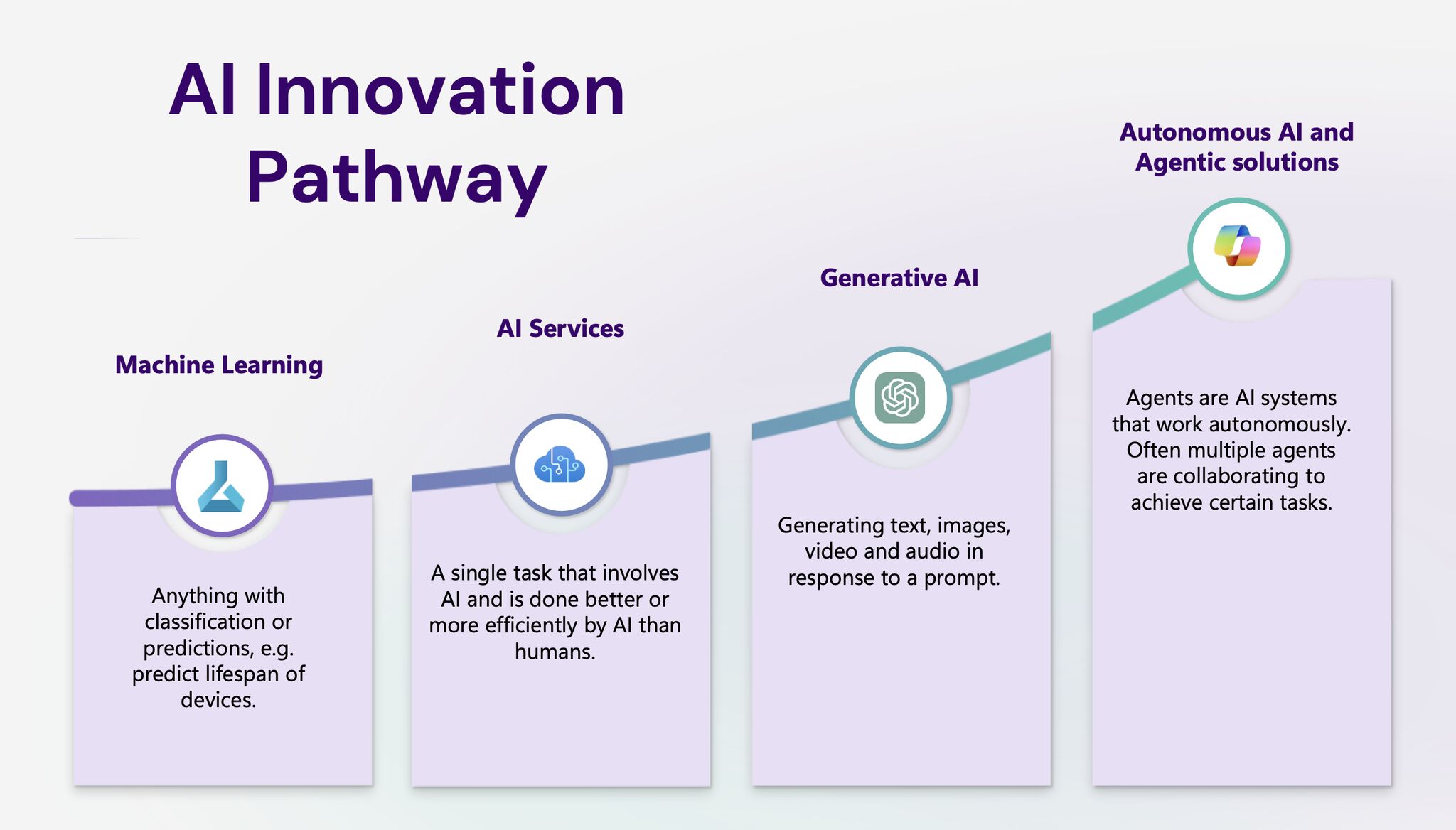
  • Autonomous AI agents

Unlike traditional AI tools that handle individual tasks, these agents can manage complex workflows, adapt their behavior based on results, and even make independent decisions. This brings AI closer to general intelligence but also raises concerns about oversight and accountability.

  • AI in disinformation control

Governments worldwide - including the EU and China - are cracking down on AI-generated fake content and deepfakes, developing tools to detect and regulate misinformation.

  • Sustainable AI

AI models require massive computing power, leading to environmental concerns. In 2025, there’s a growing emphasis on sustainable AI solutions, including energy-efficient data centers and AI-powered climate solutions.

The best AI tools of 2026

There are hundreds if not thousands of AI tools emerging the market, from lead generation to content writing or advanced personalisation. However, we selected a few which we think are the most advanced and useful tools for 2025.

1. Gemini 2.0 by Google as your newest agent

One of the most advanced AI models, Gemini 2.0 is designed for both creative and professional applications. It generates and edits visuals, making it useful for designers & marketers, summarises, drafts, and enhances research and writing, whether it’s for social media or research. Its seamless integration with Google Search, Gmail and all other Google services makes it easy to execute code, and visualise data.

2. Tidio - the hottest chatbot out there

An AI-powered customer support and chatbot platform that automates responses, boosts customer engagement, and integrates with Shopify & WordPress. Used for live chat & AI-powered chatbots to reach out and engage with potential customers and for automated email marketing to reach and compel your audience. This tool is one of the most used chatbots you have definitely encountered with!

3. Textio - for recruitment and HR

However, most people are afraid that AI would replace them, this tool is actually useful to source and find talents. Textio is an AI-driven writing enhancement tool focused on recruitment & HR. It helps companies create inclusive job descriptions and performance reviews by eliminating biased language. However, its pricing starts at $15,000 per year, making it a premium tool for larger organisations.

4. Perplexity AI - the antagonist to ChatGPT

We were all shocked but ChatGPT’s capabilities back in 2022. The chatbot quickly gained global attention due to its ability to generate human-like responses, answer complex questions, and assist with a wide range of tasks, from coding, bugging, to daily questions. Although it went through many serious updates and it’s still the most well-known chatbot, Perplexity AI is a more advanced version of it. This AI-powered search engine  provides real-time, conversational answers by pulling information from multiple sources. Compared to ChatGPT, Perplexity offers stronger live search capabilities, making it a powerful research tool.

Are You Ready for AI?

AI has reshaped industries, from automation and research to image & video creation, chatbots, and decision-making tools. AI power users hold a significant advantage in the workplace. The question is: are you ready for AI?

14/03/2025
Why migrate to the cloud? A guide of cloud migration
Cloud Engineering 5 min read
LinkedIn
Why migrate to the cloud? A guide of cloud migration

In today’s fast-paced digital world, businesses must adapt to evolving technology to stay competitive. One of the most significant shifts in recent years has been the move to cloud computing. Cloud migration enables companies to streamline operations, reduce costs, and enhance security while increasing efficiency and scalability. But why should businesses migrate to the cloud, and how can they ensure a seamless transition? This step-by-step guide explores the key benefits of cloud migration and provides insights into how businesses can make the move effectively.

What is cloud migration?

Cloud migration is the process of moving digital assets, applications, data, and IT infrastructure from on-premises servers to cloud-based environments. We all remember those huge server rooms in every office building where it was too cold to stay for long - to ensure the servers don’t overheat. This transition can involve different cloud models, including:

1. Public Cloud

AWS, Microsoft Azure, Google Cloud) - Hosted by third-party providers and shared across multiple businesses.

2. Private Cloud

A dedicated cloud infrastructure exclusive to one organisation.

3. Hybrid Cloud

A combination of both public and private cloud solutions.

Top Reasons to migrate to the cloud

1. Cost efficiency

One of the most compelling reasons for cloud migration is cost savings. Traditional on-premises infrastructure requires substantial investments in hardware, maintenance, and IT staff. The cloud eliminates these expenses by offering pay-as-you-go pricing models, ensuring businesses only pay for what they use.

2. Scalability & flexibility

Cloud computing enables businesses to scale resources up or down based on demand. Whether handling seasonal spikes in website traffic or expanding to new markets, the cloud offers unmatched flexibility compared to traditional IT infrastructure.

3. Enhanced security

Having on-premises servers raises many security issues, because if one server is down, the whole company can shut down for hours. Leading cloud providers invest heavily in cybersecurity, offering encryption, multi-factor authentication, and compliance certifications to protect sensitive data. Disaster recovery and backup solutions also ensure that data remains safe in case of an emergency.

4. Improved collaboration & remote work

With cloud-based applications, employees can access files and applications from anywhere, ensuring seamless remote work. Cloud collaboration tools like Microsoft 365, Google Workspace, and Slack empower teams to work efficiently, no matter their location.

5. Automatic updates & maintenance

Unlike on-premises infrastructure, which requires regular manual updates, cloud services automatically update software, security patches, and system upgrades, reducing IT workload and improving security.

6. Business continuity & disaster recovery

Cloud platforms offer redundancy and backup options, ensuring that data is never lost. In case of a cyberattack, natural disaster, or system failure, businesses can recover operations quickly without significant downtime.

7. Increased performance & speed

Cloud-based systems leverage high-speed global networks and optimized server performance, reducing latency and improving application speed. This results in better customer experiences and improved productivity.

How to migrate to the cloud successfully

Migrating to the cloud requires careful planning to minimize risks and ensure a smooth transition. Here’s a step-by-step guide:

Step 1: Assess your business needs

Evaluate your current IT infrastructure, applications, and workloads. Identify what needs to be migrated and choose the right cloud model (public, private, or hybrid).

Step 2: Choose a cloud provider

Select a cloud service provider that meets your business requirements. The top providers include:

  • Microsoft Azure

    Best for businesses using Microsoft products. Azure provides flexible pricing, reserved instances, and tools like Azure Cost Management to control expenses and optimise resources.

  • Amazon Web Services (AWS)

    Amazon’s cloud on-demand cloud computing platform with extensive features.

  • Google Cloud Platform (GCP)

    Great for AI and analytics-driven businesses.

Step 3: Develop a migration strategy

Decide on a migration approach:

  • Rehosting (lift and shift)

    Moving applications without modification.

  • Refactoring

    Making minor changes to optimize for the cloud.

  • Rebuilding

    Completely redesigning applications for the cloud.

Step 4: Ensure security & compliance

Review security policies and ensure compliance with industry regulations such as GDPR, HIPAA, and ISO certifications. Azure offers built-in zero-trust security, identity management (Azure AD), and compliance certifications like GDPR, HIPAA, and ISO 27001.

Step 5: Execute & monitor the migration

Perform a pilot migration to test performance before full deployment. Use cloud monitoring tools to track performance, security, and cost-efficiency post-migration.

Challenges of cloud migration: How to overcome them?

1. Downtime & disruptions

Plan migrations during off-peak hours and conduct extensive testing.

2. Security risks

Implement strong authentication measures and encryption.

3. Cost management

Monitor usage and optimise cloud costs using automation tools.

Conclusion

Migrating to the cloud is no longer a question of “if” but a “when”. Businesses that shift to cloud computing benefit from cost savings, scalability, security, and increased efficiency. However, a well-planned migration strategy is crucial for a seamless transition. By choosing the right cloud provider and approach, businesses can future-proof their operations and drive innovation in the digital era.

26/02/2025